










AI travel agent · plan it, live it, share it

Trouble: Plan it. Live it. Share it.

Trouble plans your trip day by day, keeps each day on time while you’re there, and turns it into a trip others can remix — from a weekend away to a year on the road.

  • Coming soon to the App Store

  • Coming soon to Google Play

Free to start: your first trip is included.

An interactive preview of the Trouble app with two illustrative trips: Japan (10 days, four areas, on its Day 2) and a 21-day journey through Portugal, Spain, Italy and Greece. Start on Home: open a trip from Recent trips, or See all for My Trips. In a trip, choose a tab — Overview, Days, Transport or Services — and the live bar opens Today.

Try me

Trouble

Your next destination

Plan it automatically or build it manually.

Start planning your trip

In the app: One Destination, Multi-Country Journey, Describe it.

Recent trips

Lisbon → Barcelona → Rome → AthensDrag to turn the globe

You can drag the globe to turn it. Each stop below has a label.

Real places, real photos

From Tokyo’s temples to Santorini’s cliffs.

Every photo here is a stop in one of the two example trips on this page — the same place photos Trouble shows in the app, credited to the people who took them.

  • Senso-ji’s five-storey pagoda and Hozomon gate lit up at nightPhoto: DimiTalen · CC0
    Senso-ji TempleJapan · Day 1 · Tokyo
  • Colourful Lisbon rooftops rising from the riverPhoto: Vitor Oliveira · CC BY-SA 2.0
    LisbonLisbon · Portugal
  • Sannenzaka’s stone steps between old wooden shops in HigashiyamaPhoto: Aporon999 · CC BY-SA 3.0
    SannenzakaJapan · Day 8 · Kyoto
  • The spires of the Sagrada Família rising above BarcelonaPhoto: Bernard Gagnon · CC BY-SA 3.0
    Sagrada FamíliaBarcelona · Spain
  • Mount Fuji above Lake Ashi in Hakone, with a sightseeing boat on the waterPhoto: Quercus acuta · CC0
    Lake Ashi cruiseJapan · Day 5 · Hakone
  • The Trevi Fountain in Rome, with visitors around its basinPhoto: Diliff · CC BY 3.0
    Trevi FountainRome · Italy
  • The golden pavilion of Kinkaku-ji reflected in its pondPhoto: Basile Morin · CC BY-SA 4.0
    Kinkaku-jiJapan · Day 7 · Kyoto
  • Boats in Ammoudi Bay’s little harbour below red cliffs, Oia abovePhoto: Winniepix · CC BY 2.0
    Ammoudi BaySantorini · Greece
  • Osaka Castle’s main tower above its stone walls and moat, office towers behindPhoto: 663highland · CC BY-SA 3.0
    Osaka CastleJapan · Day 9 · Osaka
  • The Ponte Vecchio over the Arno river in FlorencePhoto: Korinta · CC BY-SA 4.0
    Ponte VecchioFlorence · Italy
  • A path through the tall Arashiyama bamboo grovePhoto: Naokijp · CC BY-SA 4.0
    Arashiyama Bamboo GroveJapan · Day 7 · Kyoto
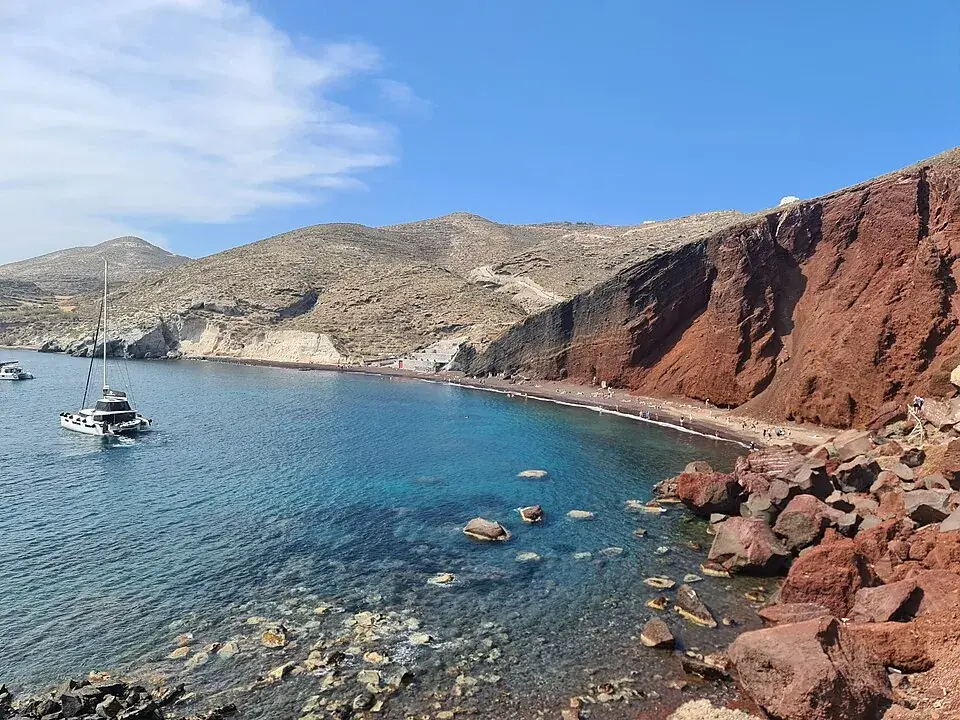
  • Red cliffs above the clear blue water of Red Beach on SantoriniPhoto: Anthony Baratier · CC BY-SA 4.0
    Red BeachSantorini · Greece

Openly licensed photos from Wikimedia Commons, credited under each photo — full credits.

01Chapter 1

Plan

A weekend, a journey across countries or months on the road — by Trouble AI or by your own hand.

One button, four ways to start

Tap +. Pick the kind of trip.

Trouble turns it into areas, days, maps, hotels, rides and tours — and it all stays editable.

  1. One DestinationOne country, city or region — or several regions of one country.
  2. Multi-Country JourneyTrouble+, Max and ProA route across up to five countries, every night accounted for.
  3. Describe itTrouble+, Max and ProWrite it like a message — where, how long, who’s coming, what you love. Trouble shows what it understood, then builds it.
  4. The Big TripOne to twelve months, up to fifteen countries, planned by weeks.

Plan with Trouble AI or Build It Yourself is always the last step: Trouble plans it all, A to Z — or you choose the areas and their days, and Trouble AI builds each day.

Trouble’s New trip sheet: One Destination, Multi-Country Journey, Describe it and The Big Trip.

One DestinationIllustrative trip

From the whole world to one country’s best route.

Choose a country. Trouble finds the areas worth staying in, the days in each and how to move between them — then fills every day.

  1. World
  2. Japan
  3. Trip route

One Destination

10 days · 9 nights · 4 areas

TokyoHakoneKyotoOsaka

  1. Arrive · Day 1

  2. Tokyo

    4 days

    Then Train · ~1h 30m to the next stop.
  3. Hakone

    1 day

    Then Train · ~2h to the next stop.
  4. Kyoto

    3 days

    Then Train · ~30m to the next stop.
  5. Osaka

    2 days

  6. Fly home · Day 10

Typical journey times, rounded — not a timetable.

Where you stay, stop by stop

The whole route on one map — Tokyo → Hakone → Kyoto → Osaka.

Four areas, each with its own plan

Kabukicho’s red gate and neon street signs in Shinjuku at nightPhoto: Basile Morin · CC BY-SA 4.0

Stop 1 · Days 1–4

Tokyo

4 days

Modern city energy, food, neighborhoods and major landmarks.

In the app: Details, Maps; in the ⋯ menu: Daily Plan, Add Hotel.
Mount Fuji above Lake Ashi in Hakone, with a sightseeing boat on the waterPhoto: Quercus acuta · CC0

Stop 2 · Day 5

Hakone

1 day

Hot springs, Lake Ashi and, on a clear day, Mount Fuji.

In the app: Details, Maps; in the ⋯ menu: Daily Plan, Add Hotel.
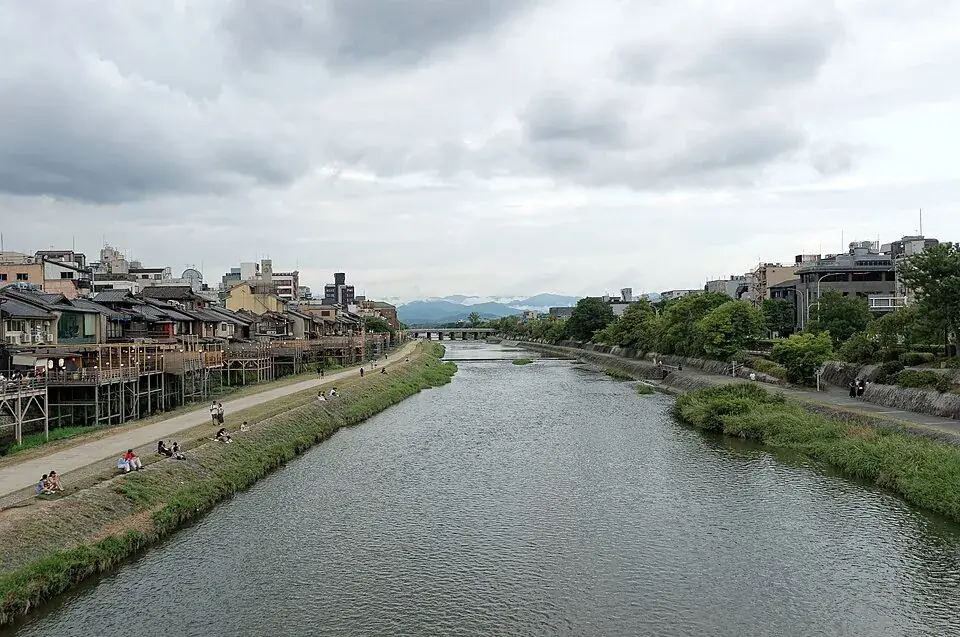
The Kamo River in Kyoto, with townhouses along its bankPhoto: Jakub Hałun · CC BY 4.0

Stop 3 · Days 6–8

Kyoto

3 days

Temples, gardens, wooden streets and quiet early mornings.

In the app: Details, Maps; in the ⋯ menu: Daily Plan, Add Hotel.
Neon signs over the Dotonbori canal in Osaka at nightPhoto: Tokumeigakarinoaoshima · CC0

Stop 4 · Days 9–10

Osaka

2 days

Street food, neon evenings and easy day trips.

In the app: Details, Maps; in the ⋯ menu: Daily Plan, Add Hotel.

Area Explorer

Kyoto

Base yourself near Kyoto Station for easy trains, then spend your days across Higashiyama, Arashiyama and the old market streets.

Tap a pin, or choose a place in the lists, to name it on the map. Circles: activities · diamond: restaurant · square: your hotel.

Daily plans
  • Day 6Temples, neighborhoods and evening Kyoto
  • Day 7Bamboo, gardens and west Kyoto
  • Day 8Kiyomizu-dera and Higashiyama
Your hotel
Things to do here
Restaurants
Tours
  • Kiyomizu-dera’s wooden stage and hall above cherry trees in blossomPhoto: Shirakawa-yobune (Wikivoyage) · CC BY-SA 1.0
    Fushimi Inari & Kiyomizu-dera walking tourIn the app: Book on Viator.

Next stop

Osaka· Train · ~30m

Days · Kyoto

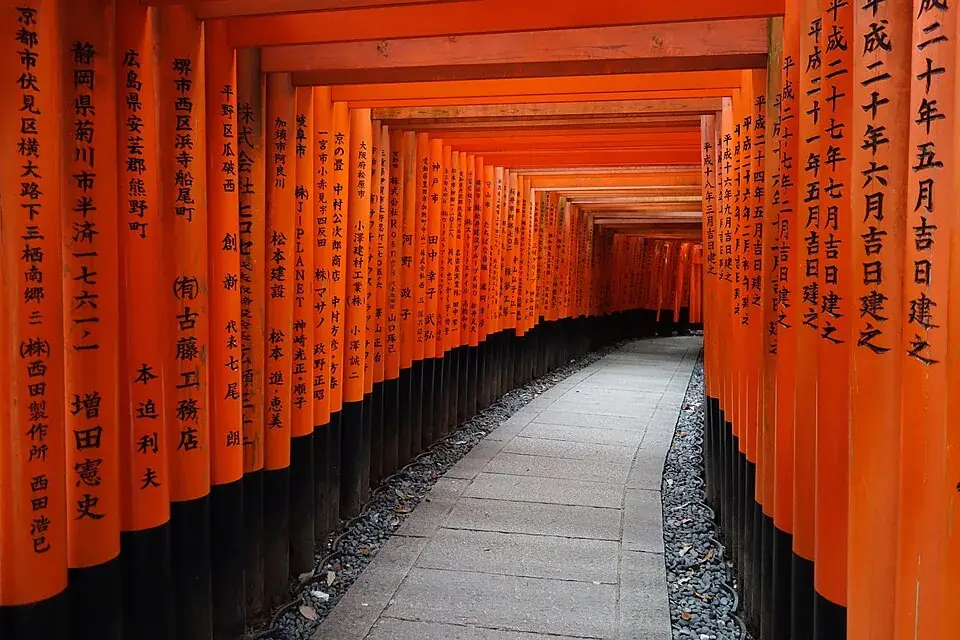
  1. A path through the tunnel of vermilion torii gates at Fushimi Inari TaishaPhoto: Luka Peternel · CC BY-SA 4.0

    Morning: Fushimi Inari Taisha

    Walk the vermilion torii gates up Mount Inari before the crowds.

    Attraction
    In the app: Maps, Details.
  2. ~19 min · Taxi to Nishiki Market

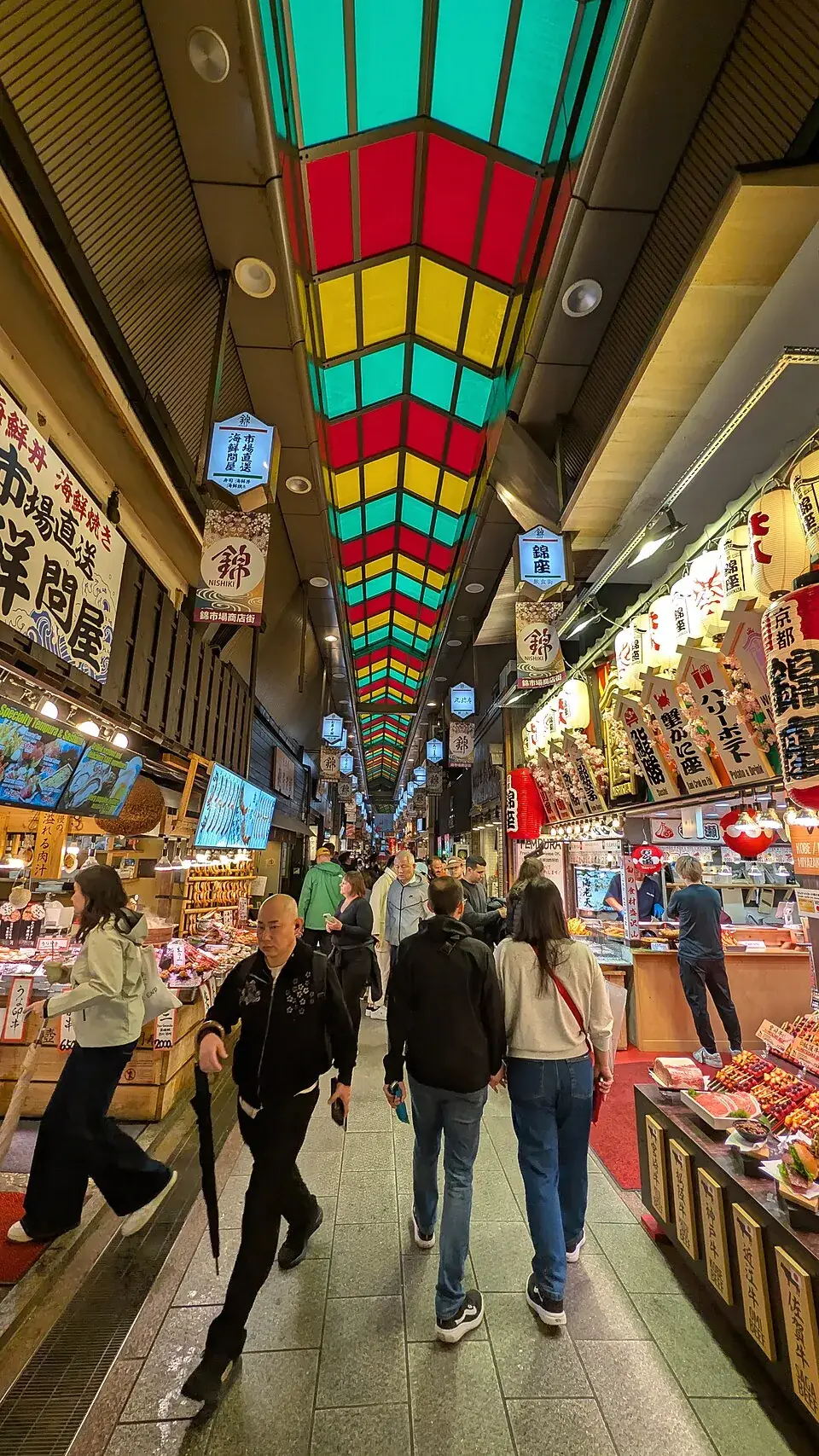
  3. Shoppers under the colourful glass roof of Nishiki MarketPhoto: Joli Rumi · CC BY-SA 4.0

    Noon: Nishiki Market

    Five blocks of pickles, tofu, sweets and street snacks.

    Attraction
    In the app: Maps, Details.
  4. ~21 min · Walk to Gion

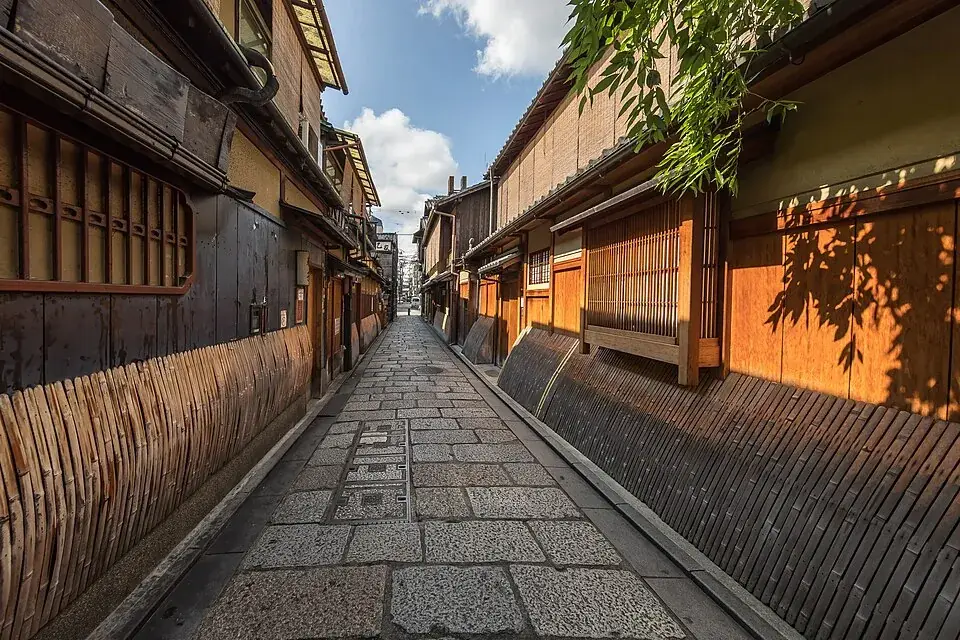
  5. Wooden houses with bamboo blinds along a cobbled lane in GionPhoto: Basile Morin · CC BY-SA 4.0

    Evening: Gion

    Lantern-lit lanes, teahouses and an evening stroll by the river.

    Attraction
    In the app: Maps, Details.

Restaurants near Gion

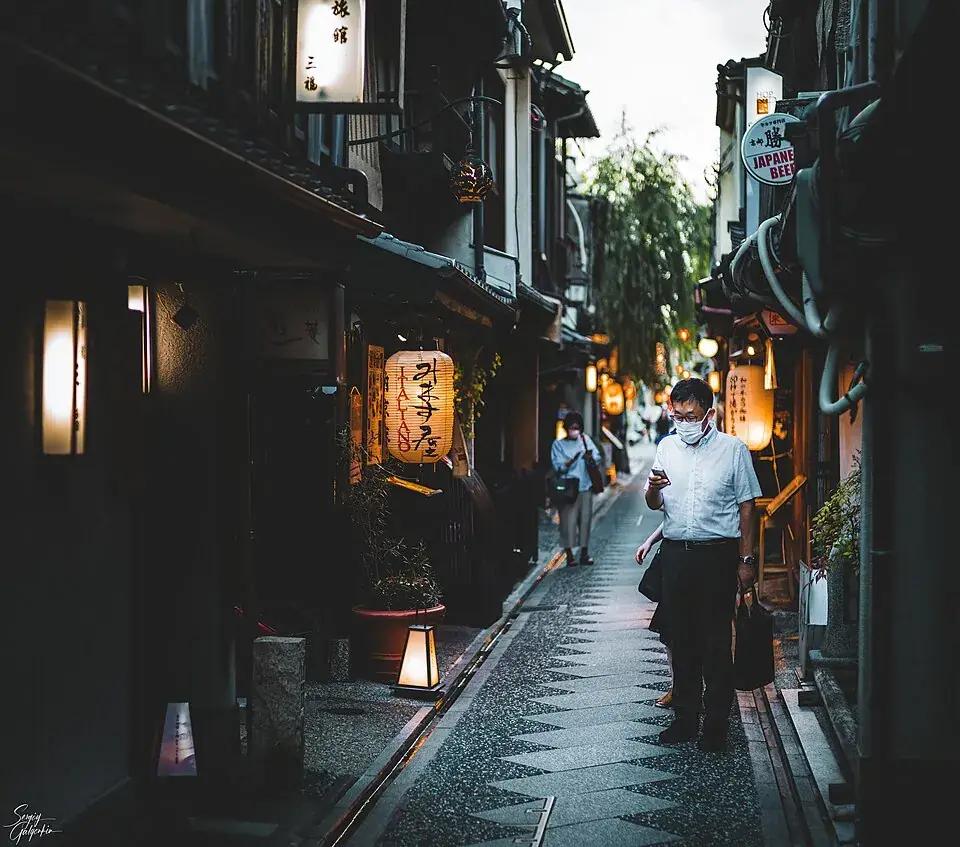
Lanterns along the narrow Pontocho alley in Kyoto at duskPhoto: Sergiy Galyonkin · CC BY-SA 2.0
Pontocho AlleyIn the app: Add to Day.

See Kyoto’s other 2 days

The Thousand Kyoto’s long dark facade with a planted terrace, by Kyoto StationPhoto: J o · CC BY-SA 4.0

Next to Kyoto Station — handy for Nara and Osaka day trips.

Your hotel

In the app: Hotel Details.opens it in Services

Services · Kyoto

  • Hotels (open)
  • Restaurants
  • Tours
  • eSIM

What else Services has for Kyoto

Hotel Detailsopens your hotel in Services, next to restaurants, tours, car rental and eSIM for the same stop.

Multi-Country JourneyExample journey

Four countries. One journey. Every night accounted for.

Trouble lays out the whole route first — the countries in order, the cities inside them, the nights in each and how you travel between them.

Multi-Country Journey

21 days · 20 nights · 4 countries

PortugalSpainItalyGreece

  1. Arrive · Day 1

  2. Portugal

    Lisbon → Porto

    4 nights

    Then Flight · ~1h 20m to the next country.
  3. Spain

    Madrid → Barcelona

    5 nights

    Then Flight · ~2h to the next country.
  4. Italy

    Rome → Florence

    6 nights

    Then Flight · ~2h to the next country.
  5. Greece

    Athens → Santorini

    5 nights

  6. Fly home · Day 21

Typical flight times, rounded — not a schedule.

Every city, night by night

  1. World
  2. 4 countries
  3. Journey route

The practical route

The globe gives the journey its shape; the map shows the way — every city joined to the next.

Countries, then the places inside them

Colourful Lisbon rooftops rising from the riverPhoto: Vitor Oliveira · CC BY-SA 2.0

Days 1–4 · 2 stops

Portugal

4 nights · 2 areas

LisbonPorto

In the app: Details, Maps.
Gaudí’s mosaic pavilions at Park Güell overlooking BarcelonaPhoto: essetefano · CC BY 3.0

Days 5–9 · 2 stops

Spain

5 nights · 2 areas

MadridBarcelona

In the app: Details, Maps.
Positano’s pastel houses stacked on the cliff above the seaPhoto: Bernard Gagnon · CC BY 4.0

Days 10–15 · 2 stops

Italy

6 nights · 2 areas

RomeFlorence

In the app: Details, Maps.
Oia’s white houses and blue domes above the Santorini calderaPhoto: Giles Laurent · CC BY-SA 4.0

Days 16–21 · 2 stops

Greece

5 nights · 2 areas

AthensSantorini

In the app: Details, Maps.

ItalyRome → Florence

Country → the areas inside it

The Colosseum in Rome in daylightPhoto: FeaturedPics · CC BY-SA 4.0

Italy

Rome

3 nights · Ancient ruins, piazzas and long lunches.

In the app: Details, Maps; in the ⋯ menu: Daily Plan, Add Hotel.

Daily plan ready

↓ Train · ~1h 35m

Florence Cathedral’s dome above the city’s rooftopsPhoto: Gary Campbell-Hall · CC BY 2.0

Italy

Florence

3 nights · Renaissance art, the Duomo and Tuscan views.

In the app: Details, Maps; in the ⋯ menu: Daily Plan, Add Hotel.

Daily plan not generated yet

Trouble builds the whole route, then you generate the Morning, Noon and Evening plan for each city when you are ready — Rome today, Florence next week. Try Generate Days on a city above; it’s an illustration of the app.

How city-by-city days work

The Big Trip

Months on the road. Planned by weeks.

For the trip of a lifetime: one to twelve months, up to fifteen countries, a route you can change any time — and your family a tap away, without tracking you.

An illustrative Big Trip across South America from November to March: Peru, Bolivia, Chile and Argentina, then Brazil, planned by weeks.
The I'm OK button: tap to let your family know.
What the family sees: Noa checked in from Cusco 9 hours ago with a note.

Illustrative A made-up traveller and route.

  • Your route by weeks

    Draft it with Trouble AI or lay it out evenly, then move weeks and countries around. The budget pace tells you whether the money lasts the whole trip.

  • I’m OK

    One tap tells your family you’re fine. The city comes from your plan, not GPS — and with no signal it waits and sends by itself.

  • A page for the family

    Invite them with a private link — no app needed. They see your route, your check-ins and your words; with the app, they get a push for each one.

  • Live, only when you choose

    Share where you are on your route for 30 minutes, 2 hours, 8 hours or until tonight: “On the way from Peru to Bolivia”, never your position. It turns off by itself.

  • SOS

    Sends an SOS with your city to your family, free on every trip, and lets you send your exact location yourself to whoever you choose. Trouble isn’t an emergency service: in an emergency, call the local emergency number first.

  • On your route

    If you turn it on, see other Big Trip travellers in your city and heading your way — city level only, first name and city, never an exact place.

Plan your way

AI when you want it. Full control when you don’t.

Every trip starts with the same few answers, then one choice. Either way, the plan stays yours to change.

Answer a few questions. Trouble drafts the route.

Countries

Portugal · Spain · Italy · Greece

Days

21

Style

Food · Culture

The route appears across the globe

Every question, with the Europe journey

Choose the places in each country and the order of your route.

  1. PortugalLisbon · Porto
  2. SpainMadrid · Barcelona
  3. ItalyRome · Florence
  4. GreeceAthens · Santorini

Reorder the countries — any of them — and the route updates. In the app’s Build Your Route you choose the places in each country and move each stop with the same arrows, then set the days.

Every step of building it yourself

Edit everything

Change one detail or the whole route.

Nothing is locked in. Try it: move Osaka before Kyoto and watch the route follow.

Edit Route

  1. Tokyo

    Stop 1 of 3

    4 days
  2. Kyoto

    Stop 2 of 3

    3 days
  3. Osaka

    Stop 3 of 3

    3 days

10 days · 9 nights

  • Add, replace or remove stops, change the days in each, reorder.

    The Japan route

  • Reorder, add or delete whole days.

    Kyoto’s three days

  • Replace or remove Morning, Noon and Evening — nothing changes until Save.

    Day 7, slot by slot

  • Say what should change; Trouble rebuilds just that day.

    Day 8, rebuilt

  • Put a restaurant or tour from Services into any day.

    Ichiran Shibuya into Day 2

Every plan can edit. Changes Trouble builds with AI use AI Actions — 10 in total on Free, 30 for a Trouble+ trip, 50 for a Max trip, 60 for a Pro trip — and manual editing never does.

02Chapter 2

On the trip

Each day on today’s clock, every ride in one tab, and the places to sleep, eat and go.

On the trip

Today’s plan, on today’s clock.

Go live on any day: Trouble shows what’s now, what’s next and when to leave — and changes the day when the day changes.

  • Live tracking

    A countdown to the next stop, “Done, next” when you move on, and a live map that follows you with live times from where you are. It starts once you’re in the trip’s country, one trip at a time.

  • Change today

    Running late, It’s raining, Skip this stop, Add free time, Found something nearby — you see the new plan before anything changes.

  • On your Lock Screen

    The day on the Lock Screen and in the Dynamic Island when you turn on Live Trip Activity, and home-screen widgets on iPhone with Trouble+, Max and Pro.

  • Your location stays on your phone

    Today and the live map use it only while they’re open and never send it. The Big Trip’s live sharing keeps it on your phone too: only where you are on your route goes to your family.

An illustrative Live page for Day 2 of the Japan example trip: leave in 42 minutes for Takeshita Street.

The Japan example trip on its Day 2 · illustrative times

Transport

Every ride of the trip, in one tab.

Overview, Days, Transport, Services: the trip’s third tab knows each area, from the airport to the last train home.

  • Transfers

    Airport transfers, the route map with every leg, getting between areas, and another ride from anywhere to anywhere. Each ride opens its ways to get there, with partners to book it — or drive it yourself.

  • Getting around

    The city’s metro, trains and buses by name, from the airport in, taxis and ride apps, and passes judged Worth it, Check or Not for this trip. Hand-checked guides for 42 cities.

  • Rent a car

    The pick-up place and dates follow the area you choose, so the search starts where you’ll be.

  • Google Maps

    Public transport routes and times for wherever you are, one tap away.

Try it in the phone at the top: open a trip and tap Transport.

Maps

The whole trip on one map.

Numbered stops and the full route, then every hotel, restaurant and activity in each area. Tap a pin: it names the place, what it is and when in the day.

Fushimi Inari Taisha

Activity · Morning

Fushimi Inari Taisha, Activity · Morning.

Activities (circles) Restaurants (diamonds) Hotels (squares)Numbered stops

Fit route

Filter All, Areas, Activities, Restaurants or Hotels — then Fit route to see the whole trip again.

How the trip map works

ServicesIllustrative examples

Where to sleep, eat, go and connect.

The Services tab gathers where to sleep, eat, go and stay connected at every stop, found for the place you’re in; a car comes from the Transport tab, pre-filled from your trip. Tap a card to see where it fits in the example trips.

  • Hotels

    The Thousand Kyoto’s long dark facade with a planted terrace, by Kyoto StationPhoto: J o · CC BY-SA 4.0

    Kyoto Station area, Kyoto

    4.6 out of 5~$320 / nightEstimated

    In the app: Details, Maps, View Booking Options; in the ⋯ menu: Save Hotel.

    via Booking.com

    See every hotel in the Japan trip

  • Restaurants

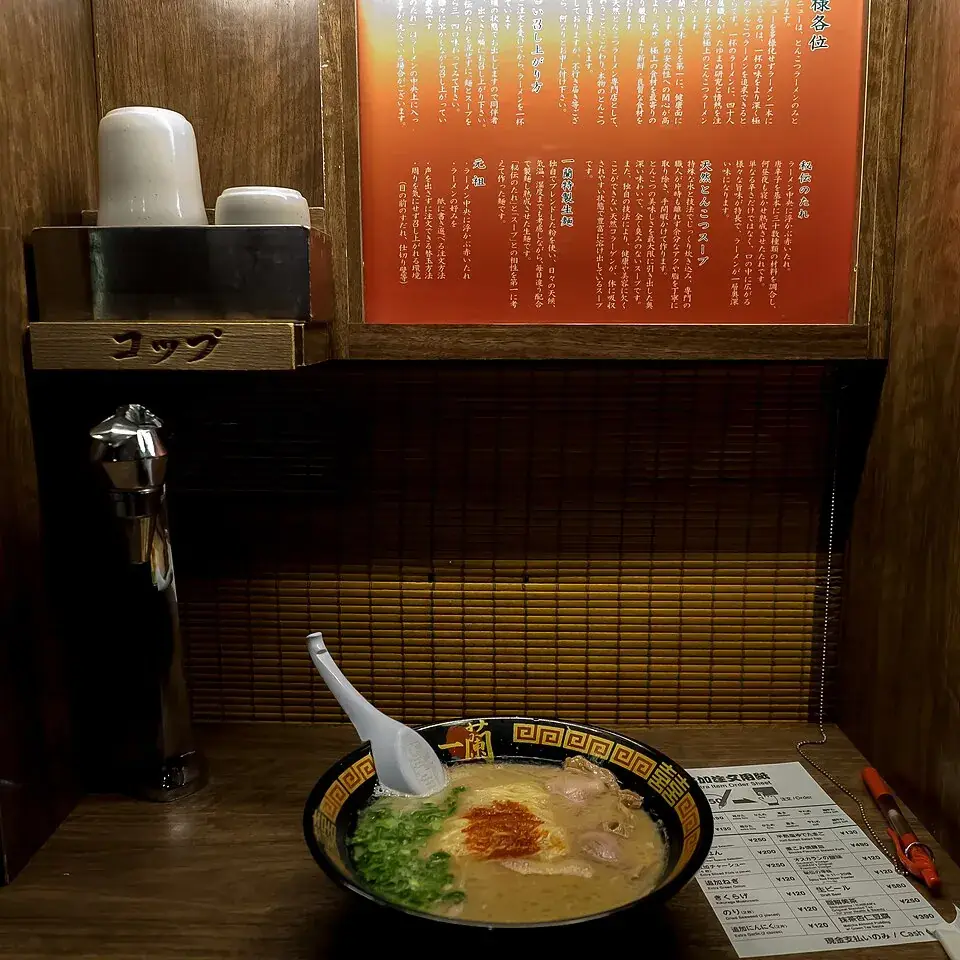
    A bowl of ramen in a solo booth at Ichiran’s Shibuya storePhoto: Ajay Suresh · CC BY 2.0

    4.3 out of 5Ramen

    0.4 km from Shibuya Crossing

    In the app: Details, Maps; in the ⋯ menu: Add to Day.

    See where it goes in the trip

  • Tours

    A path through the tunnel of vermilion torii gates at Fushimi Inari TaishaPhoto: Luka Peternel · CC BY-SA 4.0

    4.8 out of 54 hours

    From ~$75 per person

    In the app: Details, Maps, Book on Viator; in the ⋯ menu: Add to Day.

    See the Kyoto stops it covers

  • Rent a car · Transport

    Pick-up

    Sep 12 · 10:00

    Drop-off

    Sep 16 · 10:00

    Return to same location

    Pre-filled from your trip — Portugal · 4 nights. You confirm the details on DiscoverCars.

    In the app: Search Rental Cars.

    See the stretch it covers

  • eSIM

    Data

    10 GB

    Valid for

    30 days

    Plans for the countries on your trip, sold by Airalo. Live plans and prices appear in the app.

    In the app: Order eSIM.

    See it against both trips

Illustrative examples: ratings, prices and distances here are not live. Places come from Google; bookings and purchases happen on the partner’s site (Booking.com, Viator, DiscoverCars, Airalo), under their terms and prices.

03Chapter 3

Share

Post the trip you loved, remix someone else’s, and plan with the people coming along.

Discover

Trips worth stealing. Post yours, remix theirs.

Real trips from real travellers — the route, the days and the places, with the one tip that saves you an hour. Find one you like and make it yours.

An illustrative Discover post: Athens and Santorini in five days by @maya.walks, traveled, with its route, likes, comments, views and Plan it.
An illustrative traveller profile: 31 trips, 14 countries, 4.1k followers, 3.1k remixes.

Illustrative A made-up traveller; photo from the Europe example journey.

  • For you, Following, Trending

    Filter by where, how long and style, by trips people really went on or ideas, and search places, countries, titles and @handles.

  • Post any trip

    From the trip’s ⋯: a title, one tip, “I went” or “Just an idea”, a cover if you like. Shared: the days and their places. Never your dates, notes, expenses, stays or documents.

  • Remix this trip

    A copy lands in My Trips, ready to change — your dates, more days, another hotel.

  • Likes, comments and follows

    Ask the traveller a question, follow people whose trips you like, and see who liked, commented on or remixed yours.

  • Your profile

    Your posts, your trips and your travel stats — trips, days, countries, views, likes and remixes — with settings and your account in its ⋯. Pick your @username when you sign up; your profile stays private until your first post.

  • Checked before it shows

    Posts and comments are checked automatically before anyone sees them, and you can report or block anyone, any time.

Plan together

One trip. Everyone on it.

Invite the people you travel with. Everyone plans in the same trip, and changes show up for everyone as they happen.

  • And turn the link off whenever you like.

    How an invite works

  • With a note saying who updated the trip.

    What everyone sees

  • While someone edits a day, the route or the hotels, that part waits for them.

    What waits, and what it says

Invite 1 person on a Trouble+ trip, up to 2 on Trouble+ Max, or up to 3 on Trouble Pro.

Share, then Remix

Send it to anyone. Let them make it theirs.

A view-only link opens in any browser. People with the app can save their own copy, or remix it into a new trip.

  1. The recipient opens a read-only trip — route, days, map, hotels and restaurants. Never your private notes or expenses.

    What the Japan link shows

  2. One tap keeps a personal copy of the shared trip in their own My Trips.

    What they can do with it

  3. Makes an editable copy to reshape — reorder, change the days, add places. It uses one of your remixes.

    What changes, what stays

The original trip stays exactly as it was.

04Chapter 4

Tools & plans

The small things that make a trip easy, built for everyone, and what each plan includes.

Trip tools

The small things, sorted.

What you spend, what you bring, what the border will ask to see and what you’ll want to remember — inside the trip.

Colourful Lisbon rooftops rising from the riverPhoto: Vitor Oliveira · CC BY-SA 2.0

Log spending by category — Flights, Hotels, Restaurants, Attractions, Transport, Shopping, Gifts, Daily expenses or Other — in the currency you paid, with a note and a receipt photo.

See the Europe journey by category

Mount Fuji above Lake Ashi in Hakone, with a sightseeing boat on the waterPhoto: Quercus acuta · CC0

Start from a template — Basic, Summer, Beach, Ski, Work, Adventure, Business or Family — with quantities sized to your trip, your own items, and AI suggestions when you want more.

See the counts for both trips

  • Required documents

    Pick your passport and Trouble lists what each country asks — no visa, e-visa, visa on arrival — with the official sources. Your own document photos are stored only on your phone.

  • Travel journal

    Write what you went through, day by day or about the whole trip, with a photo or two. It stays on your phone.

  • Wallet passTrouble+, Max and Pro

    Your trip in Apple Wallet or Google Wallet, one tap away.

Accessibility

Built to be used by everyone.

Accessibility is part of how Trouble is built, not an afterthought.

  • Buttons, cards, tabs and sheets have spoken labels, and maps have a spoken summary.

    Hear the Japan trip

  • Text follows the text size you set on your phone, and layouts make room for it.

    See a day at a larger size

  • Trouble follows the system setting for the globe, sheets and loaders, and has its own switch to calm in-app animation.

    See the in-app switch

  • Touch targets aim for 44 points, with an option for larger map controls.

    See the larger map controls

  • Move earlier / Move later buttons sit next to every drag handle.

    See Edit Route for Japan

  • An in-app contrast option that also follows Increase Contrast, on one dark look.

    Compare the two contrast levels

Read the accessibility statement for the app and this website.

Plans

Start free. Upgrade when the trip gets bigger.

Every plan has clear limits. Nothing is unlimited, and nothing renews without saying so.

  • Free

    Start planning simple trips.

    • 1 trip in total
    • Up to 5 days, 1 country
    • Plan with AI, or Build It Yourself (1 area, up to 3 days, 1 AI Action per day instead of your trip)
    • 10 AI Actions in total for AI edits and regenerations: Edit Route, Edit Day, Regenerate and budget optimization; they do not reset
    • Limited edits: 10 edits of your own per trip
    • Days, Activities, Services, Maps, Expenses and Packing
    • Restaurant and hotel lists show the first 5 results
    • Share a read-only link
    • Ads are shown

    An AI Action is used when Trouble generates or regenerates trip content with AI; bigger changes use more, and the app shows how many before you confirm. Manual editing never uses one. No multi-country trips, collaboration or Help me find a destination. Remixes of shared trips and invites to Free trips come with Trouble+, Trouble+ Max and Trouble Pro, and so do iPhone widgets.

    What it means for the example trips

  • $9.99

    One-time purchase · 1 trip · not a subscription

    One trip with the full planning tools: a new trip, or one you already planned. Buy it again whenever you need another.

    • 1 trip per purchase · up to 21 days · buy again anytime
    • Multi-country trips, up to 3 countries
    • 30 AI Actions for the trip (AI edits & regenerations)
    • Edits of your own: no limit
    • Plan together with 1 other person
    • Help me find a destination and budget optimization
    • A Wallet pass for the trip
    • 1 remix of a shared trip and 1 invite to a Free trip, yours to keep
    • 1 iPhone widget for your Home Screen or Lock Screen
    • More restaurant and hotel results
    • Ads are shown

    Use it when you start a new trip, or on a trip you already planned (Make it Trouble+ in its Trip Settings). When the trip’s own AI Actions run out, your account’s are used.

    What it means for the example trips

  • $14.99

    One-time purchase · 1 bigger trip · not a subscription

    One bigger trip: longer, with more countries and more people.

    • 1 trip per purchase · up to 31 days · buy again anytime
    • Multi-country trips, up to 5 countries
    • 50 AI Actions for the trip (AI edits & regenerations)
    • Edits of your own: no limit
    • Plan together with up to 2 people
    • Everything in Trouble+: Help me find a destination, budget optimization, Wallet and more results
    • 2 remixes of shared trips and 2 invites to Free trips, yours to keep
    • 2 iPhone widgets for your Home Screen or Lock Screen
    • Ads are shown

    Already have a Trouble+ trip? Upgrade it to Max for $4.99 in its Trip Settings: up to 31 days and 5 countries, 20 more AI Actions, up to 2 people, and 1 more remix and invite.

    What it means for the example trips

  • $9.99 / month

    Auto-renewing subscription · monthly

    For frequent travelers and power users.

    • 1 new trip every month, and unused trips add up while you stay subscribed
    • 60 AI Actions per trip
    • Up to 60 days and 5 countries per trip
    • Edits of your own: no limit
    • Plan together with up to 3 people
    • Every planning tool: Help me find a destination, budget optimization, Wallet and more results
    • 3 remixes of shared trips and 3 invites to Free trips every month
    • 3 iPhone widgets for your Home Screen or Lock Screen
    • Plan when back online: a trip you ask for offline is planned as soon as you’re connected
    • No ads
    • Need more? Add Trouble+: 1 more trip per purchase, on top of Pro

    Trips add up. Each Pro trip’s own AI Actions are used first, then your account’s. The month’s remixes and invites start again with every paid month and do not carry over.

    Most complete plan.

    What it means for the example trips

  • $2.99 / month

    Auto-renewing subscription · monthly

    Remove ads, keep your plan.

    • Removes ads while it is active
    • Works with Trouble Free, Trouble+ and Trouble+ Max

    Adds no trips and unlocks no features; trip and day limits stay the same.

    What it means for the example trips

About prices

Prices are US App Store reference prices in US dollars. The App Store or Google Play charges the exact local price it shows you before you buy, in your currency.

Purchase terms

  • Purchases are billed by Apple (App Store) or Google (Google Play), depending on where you buy.
  • Trouble Pro and No Ads renew automatically until you cancel them in your App Store or Google Play subscription settings.
  • Trouble+ and Trouble+ Max are one-time purchases of 1 trip each, and the upgrade to Trouble+ Max ($4.99) is a one-time purchase for one Trouble+ trip. None of them is a subscription or renews; buy again whenever you need another trip.
  • A Trouble+ or Trouble+ Max purchase you have not used yet is a trip ready to use: use it for a new trip, or for a trip you already planned. From then on it belongs to that trip — its limits, its people and its AI Actions — and deleting the trip does not give it back.
  • Trouble Pro adds 1 new trip every month (at purchase and at every renewal), and unused trips add up while you stay subscribed. Each Pro trip has its own 60 AI Actions. Pro trips can be used while Trouble Pro is active.
  • Trouble Pro bought earlier at $6.99 a month is no longer sold. Its subscribers keep it while they stay subscribed, with their trips, up to 8 countries per trip and 60 AI Actions per trip; every new trip is up to 60 days, the longest trip Trouble plans.
  • The Free plan includes 10 AI Actions in total for AI edits; they do not reset, and manual edits never use them. A Free trip has 10 manual edits.
  • Use Restore Purchases in the app to restore purchases on a new device with the same store account.
  • All plans have usage and technical limits.

Full details are in the Terms of Service.

The world is big.Your plan doesn’t have to be complicated.

Trouble

Get Trouble — plan it, live it, share it.

  • Coming soon to the App Store

  • Coming soon to Google Play

See the Japan tripSee the Europe journey